


#What is Stable Diffusion?
Hey, sneakerheads! It’s Lakshita Shetty here, and today, I'm excited to share how I used Stable Diffusion, an innovative AI technology, to bring my sneaker doodles to life. If you're curious about where creativity and tech meet—especially with sneakers—you’re in the right place!
Stable Diffusion is an AI-powered, open-source model released in 2022 by Runway, CompVis, and Stability AI. Built on Latent Diffusion Models (LDMs), users can generate, modify, and upscale images using text prompts. It's a powerful tool for creative projects like mine!
Latent Diffusion Models: A New Era in Image Generation
A Step Beyond GANs
You may have heard of Generative Adversarial Networks (GANs), which revolutionized image generation in the past decade. GANs allowed the creation of new images by pitting two neural networks—a generator and a discriminator—against each other. However, despite their success, GANs had some notable limitations:
- Lack of Diversity: GANs often struggle to generate diverse images and could fall into producing repetitive outputs.
- Mode Collapse: GANs sometimes create only a limited variety of images, even if the input data is rich.
- Difficulty Learning Multimodal Distributions: GANs found capturing datasets with complex, diverse outputs challenging, limiting their flexibility.
Why Latent Diffusion Models (LDMs) are a Game-Changer
LDMs, like Stable Diffusion, take a different approach by operating in latent space—a compressed, lower-dimensional representation of an image—rather than directly in pixel space. This allows the model to focus on high-level features of the image, making it both computationally efficient and capable of producing high-quality, diverse outputs.
Here’s why LDMs represent a step forward:
- Efficiency: LDMs reduce computational load while retaining essential image features by working in latent space. This allows Stable Diffusion to run on consumer-grade hardware.
- Flexibility: LDMs enable various tasks, such as image-to-image translations, inpainting, and outpainting, all driven by text prompts or other input data.
- Quality and Diversity: LDMs can produce more diverse and creative outputs without suffering from mode collapse, as seen in GANs.
Breaking Down the Technology: How Stable Diffusion Works
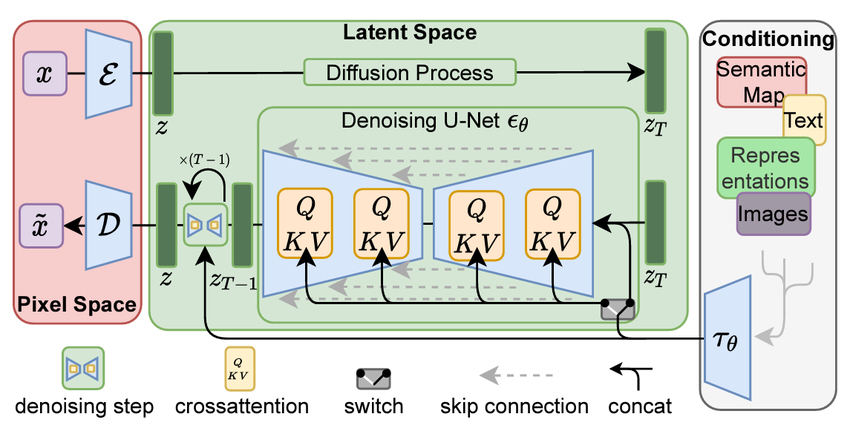
Let’s explore how Stable Diffusion works to generate images like the sneaker doodles I created.
1. From Pixel Space to Latent Space
We start in Pixel Space, where the raw image data exists as pixel values. Stable Diffusion first compresses this data into Latent Space, a more efficient representation that retains the essential features of the image.
2. Encoding and Decoding with VAE
Variational Autoencoder (VAE) handles the transformation between pixel space and latent space:
- Encoder (E): Compresses the image into latent space.
- Decoder (D): Reconstructs the image into pixel space after noise removal.
3. The Diffusion Process
- Forward Diffusion: The model progressively adds Gaussian noise to the latent representation, systematically corrupting it.
- Reverse Diffusion: The denoising U-Net removes this noise, working backwards until the clean latent image is restored, guided by the text prompt or conditioning input.
4. Denoising U-Net: The Engine of Stable Diffusion
The Denoising U-Net is at the heart of the image generation process. It uses a cross-attention mechanism (with Query, Key, and Value components) to focus on specific elements of the image based on the input prompt, ensuring alignment with the user’s vision.
5. Cross-Attention: Aligning with the Prompt
The cross-attention mechanism ensures the model refines the image according to the prompt. For instance, if I input “A colourful doodle of an Air Jordan 1 sneaker,” the cross-attention focuses on the key features of the Air Jordan, guiding the U-Net in generating an appropriate image.
6. Conditioning Inputs: Guiding the Model
The model can take several types of conditioning inputs, including:
- Text: Descriptions like “cartoon-style sneaker with graffiti.”
- Semantic Maps: Structural information about the image.
- Images: Reference images for customization or inspiration.
The Role of Prompt Engineering
Prompt engineering is critical to guiding the model’s creativity. It involves crafting detailed, structured prompts that shape the generated image.
Key Points of Prompt Engineering:
- Specificity Matters: The more detailed and specific the prompt, the better the output aligns with your vision. For example, “A colourful doodle of an Air Jordan 1 sneaker with bold outlines and a street-style graffiti background.”
- Iterative Refinement: Generating the perfect image often requires multiple iterations. I ran several iterations, tweaking prompts to adjust the level of abstraction or realism.
- Negative Prompts: These tell the model what to avoid. If the model introduces unwanted elements, negative prompts can help clean them up.
The Results: Sneaker Doodles with a Tech-Infused Twist
Using Stable Diffusion and prompt engineering, I created sneaker doodles that blend street art with iconic Air Jordan 1 elements. The bold, playful designs capture my vision while staying true to sneaker culture.
Though AI and sneakers may seem unlikely companions, they’re a perfect match. Sneakers are a canvas for creativity, and AI pushes design boundaries, blending tech and fashion seamlessly.
A Brief Guide to Stable Diffusion
Stable Diffusion is a powerful image generation model that excels in text-to-image tasks but can also handle inpainting, outpainting, and image-to-image transformations. It allows users to refine results with prompts, negative prompts, and other parameters like guidance scale and image dimensions.
Stable Diffusion Versions:
- SDXL (2023): Popular for producing high-quality 1024x1024 images.
- SD1.5 (2022): Known for speed and low memory usage.
- SD2.1 (2022): Introduced negative prompts but changed image outputs significantly.
- SDXL Turbo and SD Turbo (2023): Fast versions that produce images in a single step.
Key Features:
- Prompt & Negative Prompt: Guide the model on what to include or avoid.
- Guidance Scale: Adjusts how closely the image aligns with the prompt.
- Inpainting & Outpainting: Modify specific areas of an image or expand the canvas.
- ControlNet: Guides image generation by adding structure through inputs like depth maps or poses.
Fine-Tuning & Latent Consistency Models (LCMs)
Using techniques like Dreambooth or LoRAs, Stable Diffusion can be fine-tuned to generate specific styles or adapt to unique datasets. Latent Consistency Models (LCMs) have recently improved image generation speed, making the model faster and more efficient, especially with SDXL Turbo, which can generate high-quality images in just one step.